PXE diagnosis
A PXE job crosses several systems: the BMC, the site agent’s DHCP and TFTP, iPXE, the panel’s boot files and the installer. When a job waits too long, the job page tells you which step is missing.
The boot timeline
Section titled “The boot timeline”Every job that boots over PXE (reinstall, rescue, rescan, disk wipe, password reset) shows a timeline on its job page:
| Step | Comes from |
|---|---|
| PXE armed | The job: DHCP is allowed for the server’s PXE MAC address |
| Site agent serves DHCP/TFTP | The site agent confirms it serves that MAC |
| Power cycle | The BMC accepted the one-time boot override and the power cycle |
| DHCP request seen | The agent saw a DHCP request from the server |
| DHCP lease | The agent handed out the address |
| Boot loader (TFTP) | The server downloaded iPXE over TFTP |
| iPXE running | iPXE started and asked for its boot script |
| Boot script served | The panel served the job’s boot script |
| Installer reports | The installer or live system reported back |
| Finished | The job ended |
Site agents from version 1.2.0 report the DHCP and TFTP events from their dnsmasq log. Older agents leave those steps empty; update them under System → Agents.
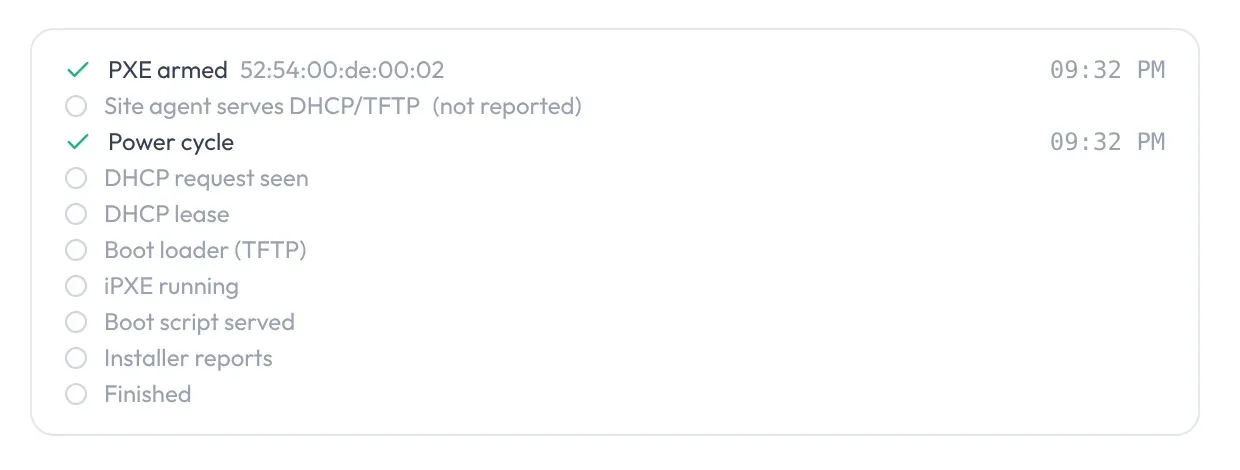
When a job is stuck
Section titled “When a job is stuck”While every step is still within its time, the job just waits. Once a step is overdue, the job page names it and lists what to check:
| Stuck at | After | What to check |
|---|---|---|
| No DHCP request | 4 min after the power cycle | Watch POST on the KVM console. Network boot must be enabled for the NIC with the PXE MAC (HPE: RBSU → Network Options → Network Boot; Dell: Integrated Devices → NIC → PXE). The boot mode must match the job (UEFI needs “UEFI PXE IPv4” in the boot order, legacy the NIC’s option ROM); with boot mode automatic and an unknown firmware mode, TrixOS retries with UEFI PXE after 7 minutes. The switch port must be in the same network (VLAN) as the site agent. |
| PXE from another MAC | same | The agent lists PXE requests from other MAC addresses that arrived meanwhile. If one of them is this server, set it as the server’s PXE MAC. |
| TFTP failed | when it happens | A firewall between server and agent may block the TFTP data ports (agent: 30000–30999/udp). The job log has the TFTP message. |
| iPXE didn’t start | 3 min after the DHCP answer | Either the boot loader was never fetched (TFTP blocked, offer rejected), or the firmware type and the boot loader don’t match (UEFI versus legacy BIOS). |
| No boot script | 2 min after iPXE started | iPXE fetches its script from the agent on port 8080, which forwards it through WireGuard: check nginx on the agent and the tunnel. “unexpected IP” in the log means the server came up with another address. |
| Installer silent | 12 min after the boot files | Look at the KVM or serial console: kernel panic, missing NIC or disk controller driver, or a prompt. The installer reaches TrixOS through the agent and needs the server’s static address and a working gateway. |
The full job log is below the timeline. You can cancel the job at any time; cancelling disarms PXE.