Servers & BMC
Servers
Section titled “Servers”A server has a hostname (what customers see), an optional server name, an owner, a site, tags, a short description and the MAC address of the NIC it PXE-boots from. TrixOS manages dedicated servers (older imported entries can be virtual or external; they still say so). Admins add servers under Servers → Add server.
The server list can show every column from the column menu: power state, hardware (CPU model, cores, memory, disks, mainboard), primary IP, current bandwidth, 1 to 30 day traffic, 95th percentiles, owner, OS, running install task, rack position, disk health, firmware state and more. The selection is stored per browser, and so is the number of servers per page (10 to 500, chosen below the list). The hostname opens the server; the owner opens the user’s page (admins and resellers).
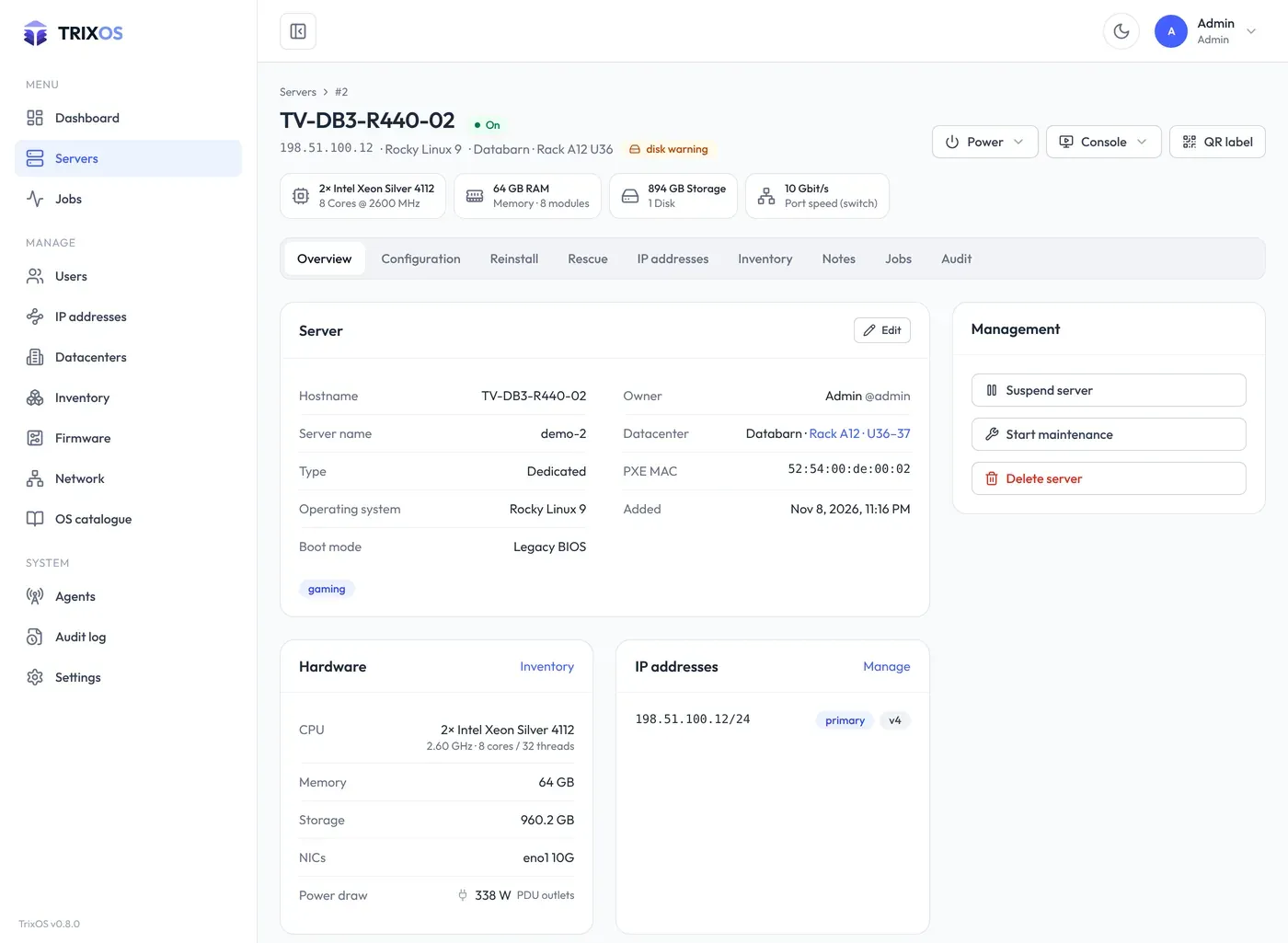
The server page opens on the Overview: details, hardware, IP addresses and the graphs (traffic when a switch port delivers data, temperatures and fans). Advanced (top right, remembered per browser) adds the BMC details, every other sensor (power, voltages, current), the traffic figures with volume and 95th percentile, and the power usage when its measurement is on. Old links to the Graphs tab open the overview with Advanced on. The IP addresses tab lists each address with its subnet, netmask (and prefix) and gateway.
Each server’s BMC card holds the connection to its baseboard management controller:
| Field | Notes |
|---|---|
| Type | ipmi, redfish, or a vendor flavour (ilo, idrac, xcc, supermicro) for vendor-specific handling |
| Host, port | Address of the BMC, reached directly or through the site agent |
| User, password | Stored encrypted with TRIXOS_MASTER_KEY; passwords are never shown again |
The poller reads the power state of every server every POLLER_POWER_INTERVAL_S seconds (60 by default) and shows
it everywhere as On, Off or N/A. Refresh power on the server list, Refresh on a server page and
trixos power refresh read it right away. N/A means the
server has no BMC, the BMC doesn’t answer, or its credentials are missing; admins see the error on the server page.
BIOS and BMC firmware versions, sensors and the vendor are read from the BMC as well, and the hardware (CPUs,
memory, disks, NICs) for servers without an OS scan: see Hardware from the BMC.
Power on, off (hard), soft off (ACPI), reset, cycle and BMC reset. Every action except power on asks you to type the server’s hostname. Power actions run as jobs: the job page shows what was sent to the BMC and the result.
Consoles
Section titled “Consoles”Each console opens in its own window with a one-time token (valid for 60 seconds, bound to you, the server and your IP address):
- Serial console (Serial-over-LAN) in a terminal.
- KVM, the graphical console, through noVNC. For BMCs whose KVM needs Java or a vendor viewer, TrixOS starts a throw-away viewer container that runs it and streams the screen.
- BMC web interface, the BMC’s own web UI in an isolated browser, already logged in. TrixOS logs out of the BMC when the session ends.
The window has keys (Ctrl + Alt + Del …), clipboard and typing, display settings, the BMC login when allowed, and End session; see Remote console for Java consoles, old TLS and temporary BMC users.
Admins can also run read-only BMC commands such as power status, sdr, sensor, sel list or fru from the
server page. Any other command counts as a change: it runs as a job, like a power action, and only when TrixOS
is out of dry-run mode.
Maintenance mode
Section titled “Maintenance mode”When a server needs work in the datacenter, an admin puts it into maintenance: Management → Start maintenance on the server page (or Start maintenance under Configuration → Main details), with a reason of at least three characters, for example “PSU 2 failed, replacement ordered”.
While the server is in maintenance:
- it shows the status Maint. in the server list (filter In maintenance) and a banner with the reason, since when and by whom on its page,
- customers can’t power it, open its console or reinstall it; admins still can,
- starting and ending maintenance sends the webhook event
server.maintenance.
Maintenance: edit / end changes the reason or puts the server back in service. The API endpoint is
PUT /api/v1/servers/{id}/maintenance.
Notes and tags
Section titled “Notes and tags”Notes on a server are visible to everyone who can see the server; sticky notes stay on top. Tags are free text and can be used to filter the server list.